Version

5.0

Size

50.5 MB

Starting Price

$29

Supported OS

Windows 11,10,8.1,8,7

Language

English

Extract Images from PDF

Extract Images from PDF with Format Options - Recover embedded images,create image galleries,and reuse graphics from your PDF documents.

(Average Rating 4.7Based on 210rating)

With PDF Champ Extract Images functionality you can retrieve any image embedded within PDF files and save them into other types of picture files of your choice. Great examples of this include recovering lost pictures,putting together picture collections,re-using graphic files etc. and retaining the highest quality of your retrieved pictures. Extract Images from PDF offers professional graphic designers,content developers and all those working with PDF files the ability to retrieve high-quality protected graphics from the source PDF file.

  • Extract images from PDF documents in an easy way.
  • Stores images in several formats such as PNG,JPG,and more for better compatibility.
  • Without having to install anything,it works right out of the EXE file.
  • Pulls images out exactly as they are,no quality loss.
  • A reliable approach to recover photos,icons,and other visuals from PDF files.
  • Allows you to pull out images from multiple PDF files in one go.
  • Works well on Windows 7+ without any trouble.
  • Get the diagrams and graphics you need for your presentations in seconds.
  • Delivers neat,well-organized results with smartly generated file names.
  • Built your image library straight from PDF documents with ease.
  • This tool is based on open source and is safe for commercial projects.
  • Explore the advanced features of this tool with a Free trial version.

Note:Extract Image is one of the many features of PDF Champ which is fully portable and runs immediately from your desktop when you click on PDF Champ.exe. There is no need to install it or follow complicated instructions just double-click the exe file to start using this tool immediately.

Situations to use Extract Images


Image Recovery

To save time by recovering pictures instead of redrawing or recreating those from scratch,this tool easily pulls out graphics,pictures,or illustrations from a PDF file that can be reused in your projects,like adding images to presentations,websites,or designs.


Image Recovery

Photo Extraction

For easy sharing,printing or keeping any pic safe for memories you can extract any pic hidden inside a PDF file such as family pictures,work portraits or event shots and save them in the highest quality with this tool.

Photo Recovery

Key Features of Extract Images


Multiple Format Support

With this advanced tool you can save images extracted from a PDF document in multiple formats like JPG and PNG. You just have to pick the format that your task requires for example if you need transparent graphics you should use the PNG format. JPG for photos or others for special uses.

Quality Preservation

It promises to maintain the quality of the extracted images from PDF files. This feature is ideal for professional work where high-quality visuals are important. This tool keeps the quality of colors and clarity of your images as they were in the original PDF files.

Organized Output

For easy searching and spotting of the resultant file,this feature extracts images from the PDF files and smartly organizes them while giving unique names to each folder. You don't need to sort them manually as each image is saved with a descriptive name and is managed in a neat and ready to use for your projects.

Fast Processing Speed

As this tool has an optimized engine that handles every heavy file with many images easily within a few minutes,you don't have to wait for hours or days for the output. It can deliver the result quickly and efficiently without harming the quality of the original images.

Extract Images FAQs


Extract Images of PDF is a part of PDF Champ that swiftly pulls out images from your PDF files and gives precise results without harming the quality of the original image.

Follow these simple steps to know how the tool works:
1. Download and launch this tool on your system.
2. Choose the Extract Images option and upload your PDF file.
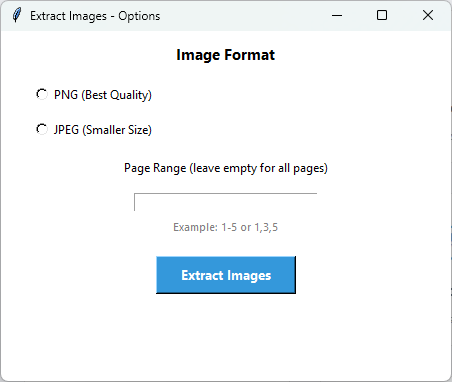
3. Choose the Image Format and add the Page Range.
4. Add the location for your output and archive it in an existing file or create a new one.
5. The process will start smartly and a notification will pop up on the screen when it's done.
No,there is no need to set up or install this tool as it is a portable tool you just double-click the PDF Champ.exe and it will open easily.
It supports image formats such as PNG and JPG one is to maintain the highest quality and the other is perfect for photos.
All the advanced functionalities are available in the free demo edition but it will only extract the first page of the PDF and it will also leave a watermark on the extracted images.
You can as this tool is specially designed to handle multiple PDF files in one go without any trouble.

Demo Version & Comparison


Demo Version Limitations

The demo version of Extract Images allows you to try the feature before purchasing,with these limitations:

  • Extract Images:Processes only the first page of PDF files
  • All output PDFs have a "PDF Champ" watermark
  • Batch extraction:Limited to single file processing in demo
  • Full version:Extract images from all pages without watermarks

Comparison:Demo vs Full Version

Features
Demo Version
Full Version
Page Processing
First page only
All pages
Image Formats
PNG,JPG available
PNG,JPG,and more
Batch Extraction
Single file only
Multiple files
Output Watermark
Yes - on all PDFs
No watermark
Quality Preservation
Available
Available
Cost
Free
Purchase required

Extract Images Specifications


💻
Software Information
Feature Name
Extract Images
Part of
PDF Champ Version 6.0
File Size
Portable Application
Operating System
Windows 7 or later (64-bit)
🔧
Compatibility & Format
Extraction Features
Multiple format support (PNG,JPG,etc.),Batch extraction,Quality preservation,Organized output
File Formats
PDF files (input),PNG,JPG images (output)
License
Trial + Full
Language
English
⚙️
System Requirements
Processor
1 GHz or faster
RAM
2 GB minimum (4 GB recommended)
Hard Disk
500 MB free space
Display
1024x768 resolution

Extract Images Reviews


Customer Review

  As a beginner I really liked this tool's modern and self-explanatory interface,as all I have to do is upload the PDF file and make a few clicks,and it will extract images from the PDF file in a few minutes,without any confusion or complex steps. I totally recommend this tool!  

Customer Review

  I had hundreds of PDF files from which I needed to pull out some images and manually handling each file one by one was very time-consuming for me so I tried this tool and to my surprise it worked fabulously and delivered the results in just minutes without harming the quality of the images. Loved this tool!  

Customer Review

  I really liked that it offers image formats which I can select according to my task requirement as for high-quality maintenance I can choose PNG,and for images,I can select the JPG format,and can also select the Page Range for the targeted task,which is quite conventional for me. Thank you,Softaken,for developing this software.  

Customer Review

  The tool works flawlessly,as I wanted to try this PDF to image extractor for a long time,but I was a little skeptical about buying the license version,so I tried its free demo version,which helped me examine its features,and I invested in the full version,which works as it promises,and it's amazing to work with.